
Should you upgrade your Xbox One with an SSD?
In this post, we will discuss the benefits and drawbacks of upgrading your Xbox hard drive to an SSD. We…


Sound issues are common in Windows 10 machines, today I will guide you through how to solve this issue and get back to your favourite music.
Firstly, you need to ensure that your sound is on. Navigate to the bottom right of your main display and left-click the speaker icon. Make sure that the volume is set to 100 (if you have external speakers, make sure they are turned on, you can find the instructions in the user manual that comes with the speaker).

1. If the problem persists, we need to dig into the settings. Press the icon in the bottom left corner of your main display and them type ‘Settings’.

2. Left-click ‘Settings’, then click ‘System’ > ‘Sound’:

3. Click ‘Choose your output device’ and left-click the correct output device:
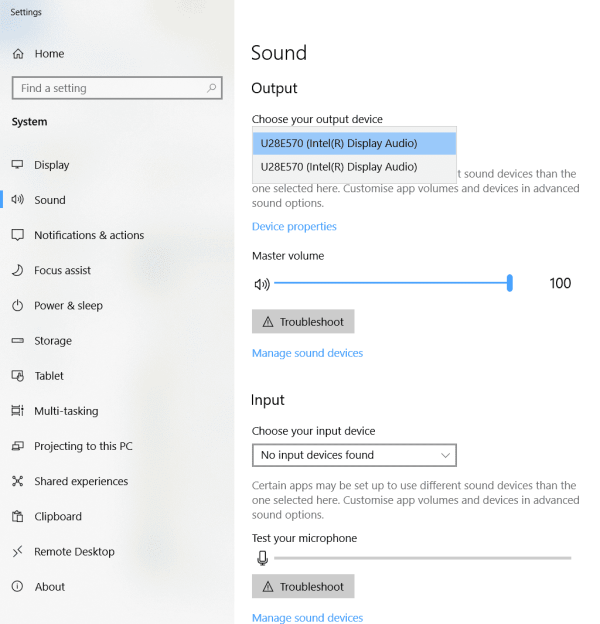
4. Now that you’ve selected the correct output device, play your favourite music or a random video to check the computer sound is working properly. If you hear audio through the speakers, you’ve fixed the issue and your computer will function as normal.
If your problem persists and you still cannot hear any sounds from your computer, at Solent Way Computers we offer Remote Access Support to deal with software issues. And for any hardware issues, then don’t hesitate to phone 01329 535 001, contact us via our contact form or visit our workshop based in Lee-on-the-Solent.
To find out more about Solent Way Computers and to keep updated with our latest posts on computer tips, tricks and quick troubleshoot fixes, please sign up for our newsletter.


